
TLDR: The Mac Mini I ordered so I could run my agent Chintu on it was finally delivered. A day later, I had it up and running with Chintu but for the next week the OpenClaw gateway would stop on all channels (WhatsApp, Telegram) after a few minutes of inactivity but come right back if I ssh'ed into my Mac Mini and set up a tunnel to the OpenClaw dashboard. After blaming everything from sleep settings to WhatsApp and Telegram channel implementations, it turns out the solution was running openclaw gateway under caffeinate. This is the story of how Chintu and I figured the problem out and what we did to address it.
The symptom
For about a week, Chintu kept ghosting me. I’d send a WhatsApp message in the afternoon, get nothing, SSH into the Mac mini, set up a tunnel, load the OpenClaw control dashboard, and within seconds Chintu would wake up and start talking to me. It was weird magic. The dashboard didn’t seem to do anything. I wasn’t restarting the gateway. I wasn’t clicking anything. Just opening the page in a local browser tab brought Chintu back. That’s the kind of “fix” that should make any engineer suspicious. Software doesn’t get better because you look at it.
Things I wrongly blamed first
- The WhatsApp channel was dying. Upon further investigation the channel was holding its websocket fine.
- The Telegram polling token had an issue. Turned out the token was fine but the call itself was failing.
- The gateway was hanging. Nope — the gateway service was terminated, just in a way I hadn’t noticed yet because by the time I looked, it was alive again.
- Firewall or an idle timeout was killing connections. I connected the Mac Mini to the same network as my Ubuntu box even using the same ethernet cable. Problem still persisted.
What actually went wrong
- I went into
~/.openclaw/logs/stability/and found a handful of*-uncaught_exception.jsonfiles, each witherror.code: ENETDOWNand a destination IP like149.154.167.220:443(Telegram) or160.79.104.10:443(Anthropic). ENETDOWNis the error code for “the egress interface is gone” — not “host unreachable,” not “connection refused,” but the network itself is down. That’s a strange thing for a Mac Mini plugged straight into my Ubiquiti network via Ethernet cable and on AC power to be claiming.- So I went looking for who was knocking out the network (
pmset -g log | grep -iE "sleep|wake") and found the computer was:
Entering Sleep state due to 'Maintenance Sleep'
en0 driver is slow (msg: WillChangeState to 0) (2551 ms)
- Every few minutes, all day long, macOS was quietly putting itself into “Maintenance Sleep” (the Power Nap cycle). Each cycle briefly drives en0 to state 0 for ~2.5 seconds before bringing it back.
- To a foreground app or an idle laptop user, this is invisible because connections that already exist keep working. But a server process like OpenClaw is constantly opening new outbound HTTPS connections (Telegram long-poll every 30 seconds, Anthropic API calls, channel webhooks).
- When one of those
connectcalls landed inside the ~2.5-second en0-off window, the kernel returnedENETDOWN, the error went uncaught, and the gateway process exited.
So the root cause wasn’t the channels, wasn’t the gateway code, wasn’t the network. It was macOS itself, helpfully going to sleep for a couple of seconds every few minutes to do housekeeping I didn’t ask it to do.
Why accessing the dashboard fixed it temporarily
Once the gateway crashed, here’s what was happening:
- launchd, the macOS service supervisor, would see the crash and try to respawn the gateway.
- The gateway would crash again on the next Maintenance Sleep, and the next.
- launchd has an undocumented respawn-protection mode for crash bursts. After a few quick failures it silently parks the agent and stops respawning waiting for what its docs cryptically call “non-ipc demand.”
- Me SSH’ing in and opening the dashboard was that non-ipc demand: keyboard, mouse, user-foreground app, network ping to the local gateway port. launchd interpreted it as “ah, someone actually needs this service,” and respawned it.
So the dashboard wasn’t fixing the gateway. The dashboard was waking launchd out of its parked state. The reason it always felt instant was that the gateway only takes a couple of seconds to start once launchd allows it.
Three attempts at a fix
Attempt 1 — pmset flags. The obvious lever:
sudo pmset -a sleep 0 disksleep 0 standby 0 powernap 0
This reduced Maintenance Sleep events from roughly 150–200 per day to about 28 per day. Big improvement. Not a fix. macOS still slips into maintenance sleep for TCPKeepAlive and mDNS upkeep regardless of those flags because those are managed by powerd, not by the user-visible settings.
Attempt 2 — work around it at the gateway layer. I considered (and shelved):
- Catching
ENETDOWNin OpenClaw’s outbound HTTP path and retrying it. That’s the right upstream fix, but I’d be patching code that wasn’t mine in a project that had recently been moving fast in the same area. Also, even a perfect retry would still leave the gateway momentarily blind during each en0 flap. Treating the symptom, not the cause. - Tightening launchd’s
ThrottleIntervalso respawns happen faster after a crash burst. Doesn’t help with the silent-park behavior at all. sudo pmset -a tcpkeepalive 0to disable Apple’s network maintenance wakeups entirely. Risk: breaks Find My, iMessage push, and other things on this Mac that I actually want to work.
Attempt 3 — the fix that stuck: a caffeinate sidecar. macOS ships a small utility called caffeinate that asserts power-management flags telling the kernel “do not sleep.” With the -w <pid> flag, those assertions are tied to a specific process and live exactly as long as that process does. If the process dies, caffeinate exits and the assertions go away — clean and self-scoping. I built a small LaunchAgent (ai.chintu.gateway-caffeinate) that:
- Finds the running OpenClaw gateway PID.
- Spawns
caffeinate -s -i -w <gateway-pid>so the assertions track the gateway lifetime. - Watches that caffeinate process. If it ever exits, which only happens when the gateway dies, the supervisor logs the death, looks up the new gateway PID once launchd respawns it, and spawns a fresh caffeinate. Re-attach measured at about two seconds.
- Holds its own PID lockfile so two supervisors can’t run at the same time.
Three files total: the supervisor script, the LaunchAgent plist, and a log. The whole thing runs alongside OpenClaw, not inside it. If openclaw doctor regenerates OpenClaw’s own plist (which it does — I confirmed by reading the source), my sidecar is unaffected.
Verifying the fix
After turning it on, here were the results overnight (I had Chintu keep a cron for them):
- Maintenance Sleep events: 0 (was ~28/day after the partial pmset fix; ~150–200/day before any fix).
- New
uncaught_exceptionbundles: 0. - Gateway uptime: 19+ hours continuous,
runs = 1, last exit code = “never exited.” - Number of “Chintu, are you there?” messages I had to send at 6am: also zero.
This pattern is well-established
The “wrap your always-on Mac service with caffeinate” pattern is not new, and that was reassuring to find other examples of it.
- The Plex Media Server community has been doing this for years. The standard recipe is to edit the Plex Homebrew LaunchAgent plist and prepend
/usr/bin/caffeinate -ims --to itsProgramArguments, so caffeinate launches Plex and holds power assertions for exactly as long as Plex is running. Same pattern, same-s“stay awake while this child process is alive” semantics. - There are even general-purpose tools like the open-source alwaysBeCaffeinating LaunchDaemon (
caffeinate -dimsuas PID 1’s child) that exist precisely because operators of Mac-based servers keep hitting this class of problem.
The only twist in my variant is the sidecar shape rather than the wrapper shape. Plex’s recipe wraps the Plex binary directly in caffeinate, which means restarting Plex restarts caffeinate. OpenClaw’s gateway plist gets regenerated by openclaw doctor on every run, so wrapping it that way would get clobbered. Running caffeinate as a separate LaunchAgent that tracks the gateway PID sidesteps that and adds the self-healing re-attach as a bonus.
A few sharp edges I hit along the way
openclaw doctorrewrites its own LaunchAgent plist on every run, so editing~/Library/LaunchAgents/ai.openclaw.gateway.plistdirectly gets stomped. Operator-side workarounds need to live in a separate agent.- launchd’s
KeepAlive=trueas a plain boolean is not enough. After a crash burst, launchd silently switches to on-demand-only mode and waits for an external trigger. The dict form (SuccessfulExit=false,Crashed=true) is closer to what you actually want, but even that doesn’t fully escape the silent-park behavior. - macOS
pgrep -fchokes on--port-style arguments in match patterns. Useps -axo pid=,command= | awkinstead. - The
ps | grep <my-name>self-match trap is real. Any shell script that greps its own name will match its own command line. Use a PID lockfile.
Wrap
Most of the actual reliability of a system isn’t in the happy path. It’s in the small handful of edge cases where one component’s reasonable assumption (connect() won’t return ENETDOWN on a healthy network) collides with another’s (Maintenance Sleep should be invisible to applications) collides with a third’s (KeepAlive=true means what it says).
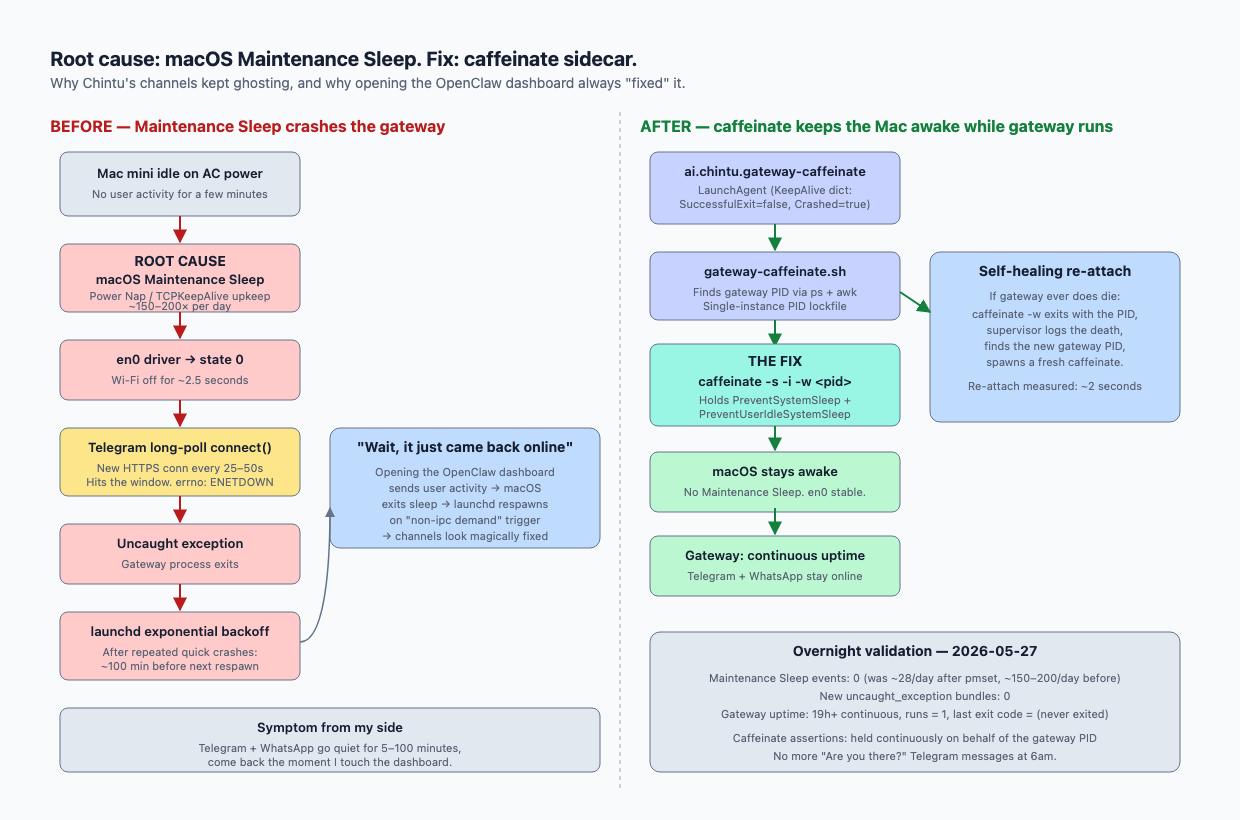
Hopefully useful to anyone running OpenClaw on a Mac that isn’t being used interactively.
Giving back
Two small contributions back to the OpenClaw project came out of this:
- An operator-side troubleshooting section for the macOS Maintenance Sleep → ENETDOWN → launchd silent-park chain is now live in the project docs. Peter Steinberger (the project lead) picked up the content from my PR and landed it directly with a co-author credit — commit 6727985365, rendered at docs.openclaw.ai → Gateway troubleshooting.
- A follow-up PR documenting the caffeinate operator pattern (with the Plex precedent and the laptop caveat) is open at openclaw/openclaw#87394, awaiting maintainer review.
Next step, work with Chintu to publish our first co-built iOS app!